Scandinavian Folk Art Floral SVG
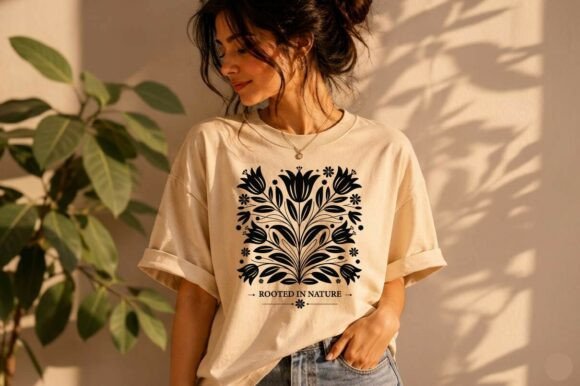
Scandinavian Folk Art Floral SVG is more than a decorative file—it’s a functional design asset built for precision, consistency, and cross-platform usability. Rooted in the clean lines and balanced motifs of Nordic folk traditions—and refined with influences from Polish Wycinanki—this vector design delivers immediate visual cohesion without sacrificing technical integrity. Its symmetrical tulip flower silhouette tile layout isn’t just aesthetically grounded; it’s engineered to behave predictably across tools, materials, and production methods.
How It Fits Into Real Creative Workflows
For designers, makers, and small business owners, the value of Scandinavian Folk Art Floral SVG lies in its role as a workflow accelerator—not a standalone decoration. It enters the process early: during concept refinement, when selecting motifs that reinforce brand tone (e.g., rustic elegance for farmhouse goods or minimalist sophistication for wedding stationery); during production planning, where its high-contrast black-on-transparent structure eliminates guesswork for vinyl weeding or laser power calibration; and during output scaling, where its vector foundation ensures crisp rendering whether printed at 2” on a coaster or engraved across a 24” wood panel.
Unlike raster-based floral patterns that degrade at scale or require manual cleanup, this SVG retains clean, closed paths and intentional negative space. That means less time troubleshooting jagged edges in Cricut Design Space and more time iterating on placement, layering, or color blocking in Adobe Illustrator.
Compatibility Across Tools and Teams
The included file suite—SVG, EPS, DXF, and 300 DPI PNG—isn’t just a list of formats. It reflects deliberate compatibility mapping:
- SVG works natively in web-based design platforms like Cricut Design Space and Silhouette Studio Designer Edition. Its layered structure lets you isolate tulip petals, leaves, or starburst elements for selective coloring or resizing—ideal when adapting the same motif across product lines (e.g., using only the central tulip for a mug sublimation, then the full tile for a wall decal).
- EPS serves professional designers who need editable anchor points, consistent stroke behavior, and CMYK-ready output for print vendors. It integrates smoothly into Illustrator-based brand asset libraries, allowing consistent application across packaging, social templates, and presentation decks.
- DXF bridges the gap for users of entry-level software or CNC workflows. It preserves geometry without stylistic interpretation—critical when feeding files into laser cutters or routers where path fidelity directly impacts material yield and toolpath efficiency.
- PNG removes vector dependency entirely. The transparent background and resolution make it drop-in ready for DTG printers, sublimation workflows, or digital mockups—no tracing, no anti-aliasing fixes, no transparency flattening.
This multi-format approach reduces friction between roles: a marketer can grab the PNG for an Instagram post while the production manager uses the DXF for batch cutting, all pulling from the same source file. No version mismatches. No re-export delays.
Practical Implementation Tips
Start with your output medium—not your aesthetic preference. If you’re laser engraving birch plywood, test the SVG at 10% power first using only the outer silhouette layer. Its solid black fill and lack of gradients mean consistent burn depth without halftone artifacts. For sublimation on ceramic mugs, use the PNG and align the tile edge-to-edge in your RIP software; the symmetry ensures seamless repeats without visible seams or misalignment drift.
When building stencils or decals, group related elements before exporting. In Silhouette Studio, for example, combine the tulip and adjacent leaves into one compound path to prevent accidental separation during weeding. The design’s intentional spacing between botanical forms makes this step faster—no pixel-level trimming required.
For textile applications like tea towels or cushion covers, import the SVG into your embroidery software or fabric printing platform at native size, then scale uniformly. Because the original was built on a square grid, proportions hold true even at 150% enlargement—no distortion, no re-rasterization.
Long-Term Usability and Quality Control
A key advantage of Scandinavian Folk Art Floral SVG is its resistance to obsolescence. Unlike trend-driven graphics that date quickly, its heritage-inspired composition—balanced symmetry, restrained ornamentation, and clear negative space—aligns with enduring design principles. That means it remains usable across seasonal collections, rebranded product lines, or expanded SKUs without visual fatigue.
For quality control, embed the SVG into your asset management system with descriptive metadata: “Scandinavian Folk Art Floral SVG – Symmetrical Tulip Tile – Black Only – No Gradients.” This avoids confusion with similar-looking but technically incompatible files (e.g., hand-drawn scans or low-res clipart). When sharing with contractors or print partners, send the EPS or DXF—not just the SVG—to guarantee editing fidelity and avoid font or effect substitution issues.
Organize variants by use case, not format. Create folders like “Sublimation Ready,” “Vinyl Cutting,” and “Embroidery Prep,” each containing the appropriate file plus a README noting recommended settings (e.g., “Laser engraving: 65% power, 12 mm/s, vector mode”). This turns a single download into a repeatable, documented production node.
Integration With Broader Creative Systems
Scandinavian Folk Art Floral SVG doesn’t exist in isolation. It functions best when aligned with complementary assets: pair it with neutral-toned serif typefaces for wedding invites, or layer it over linen-textured backgrounds for digital mockups. Its monochrome nature makes it compatible with Pantone spot-color workflows—assign the black layer to a custom ink for tactile foil stamping on premium stationery.
Educators and workshop leaders use it to teach vector fundamentals: students trace the symmetry, isolate layers to understand grouping logic, or modify individual petals to explore proportion and balance. Freelancers embed it into client style guides as a “heritage motif module”—a reusable element that reinforces brand storytelling without requiring custom illustration for every new deliverable.
For bloggers and content creators, it’s a production shortcut. Instead of commissioning custom illustrations for a post about Nordic design history, embed the SVG as a visual anchor—then annotate its elements directly in Canva or Figma to explain compositional choices. That adds educational value while maintaining visual authority.
What to Expect After Download
You’ll receive four files, each serving a distinct operational need—not redundant versions. Before opening any file, verify your software version supports the format (e.g., Silhouette Studio Basic requires DXF; Designer Edition handles SVG natively). Open the SVG first to preview layer names and structure—this gives immediate insight into how the design was constructed and where edits will have the most impact.
If you’re using it for physical products, run a single-test cut or print before batching. Even with optimized vectors, material thickness, blade wear, or printer calibration can affect outcome. Use the symmetry to your advantage: rotate the tile 90° and compare alignment—any deviation highlights a setup issue, not a file flaw.
Finally, treat it as a living component—not a one-off download. Save edited versions with clear naming conventions (“Scandinavian Folk Art Floral SVG – Mug Layout – 3.5in Circle Crop”) so future projects build on prior decisions instead of restarting from scratch.