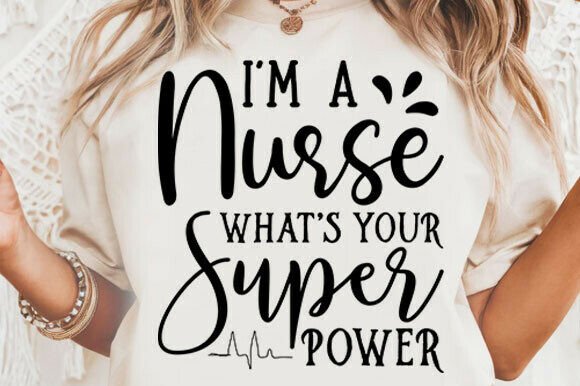
I’m a Nurse—What’s Your Super Power? SVG
This I’m a Nurse—What’s Your Super Power? SVG is a high-quality, ready-to-use digital design crafted for creators who value precision, flexibility, and professional-grade output. It’s not a physical item—it’s a functional asset: a scalable vector graphic built to integrate seamlessly into your creative or business workflow. Whether you’re designing staff appreciation gifts, launching a nurse-led brand, or producing custom merchandise for healthcare events, this file set gives you full control without requiring design expertise.
How This SVG Fits Into Real Creative Workflows
Digital cut files like the I’m a Nurse—What’s Your Super Power? SVG sit at the intersection of intention and execution. They’re not standalone decorations—they’re production-ready components that move with you through planning, prototyping, and delivery. For example, if you’re organizing a hospital wellness fair and need branded tote bags, mugs, and vinyl decals for breakroom walls, this SVG becomes part of your asset library before you even order materials. You open it in Cricut Design Space or Silhouette Studio, resize it to fit each surface, adjust colors to match your palette, and send it straight to your cutting machine—or export it for print-on-demand services.
It also supports iterative decision-making. Say you’re testing messaging for a nurse recruitment campaign. Instead of commissioning new artwork for every variation, you use this SVG as a consistent visual anchor while swapping supporting text or backgrounds. That keeps branding cohesive across social posts, email headers, and printed flyers—all from one source file.
File Types and Why Compatibility Matters
The ZIP folder includes five formats: SVG, PNG (high-resolution), DXF, EPS, and PDF. Each serves a distinct purpose in different stages of a project:
- SVG is your go-to for web-based design tools and cutting machines—it preserves layers, transparency, and scalability without quality loss.
- PNG works when you need pixel-perfect placement on websites, presentations, or mockups where vector editing isn’t required.
- DXF ensures compatibility with CNC routers, laser engravers, and older versions of Silhouette Studio that don’t fully support SVG.
- EPS is ideal for professional print shops or designers using Adobe Illustrator who need editable vector paths and CMYK color fidelity.
- PDF provides a universal, print-ready version—useful for quick proofs, client approvals, or internal documentation.
Having all five means you’re not locked into one platform or vendor. If your local print shop requests EPS but your team uses Cricut, you’re covered. If you pivot from vinyl decals to embroidered patches, the SVG scales cleanly; if you later need rasterized assets for Instagram ads, the PNG delivers clarity at any size.
Integration With Tools, Teams, and Timelines
This SVG doesn’t exist in isolation—it connects to your existing stack. In a small business setting, it might live in a shared cloud folder labeled “Branded Assets,” tagged and named consistently so marketing, operations, and admin staff can locate it in under 10 seconds. When paired with Canva templates or pre-built Cricut project files, it cuts setup time by 60–80% compared to starting from scratch.
For educators or clinical trainers developing recognition programs, the SVG integrates directly into lesson plans or staff orientation decks. You can insert the PNG into a PowerPoint slide about empathy in patient care—or layer the SVG over photos of real nurses in your facility for personalized thank-you cards. No licensing hurdles, no attribution requirements—just clean, immediate reuse.
If you run a side hustle selling nursing-themed apparel, this file becomes part of your production pipeline: uploaded once to Printful or Gelato, then mapped to dozens of SKUs (t-shirts, hoodies, aprons) with consistent sizing and alignment. That consistency builds trust—customers recognize your style across products, and platforms like Etsy or Shopify display thumbnails more reliably when assets meet resolution and format standards.
Practical Tips for Long-Term Use
Start by organizing the ZIP contents in a way that supports speed and accuracy. Rename files clearly—for example: nurse-superpower-svg-v1.svg, nurse-superpower-png-300dpi.png. Store them in a dedicated subfolder within your broader “Healthcare Brand Assets” directory. Add a brief README.txt noting compatible software versions (e.g., “Tested in Cricut Design Space v7.1+, Silhouette Studio Business Edition v5.2+”).
Before mass production, test the SVG on your intended medium. Cut a sample on masking paper first to verify stroke width and spacing—especially if applying to curved surfaces like mugs or water bottles. For fabric applications, check how the design holds up after washing by running a small batch through your standard laundry cycle. These micro-tests prevent costly reprints and maintain quality control across batches.
Keep an eye on usage context. The phrase “I’m a Nurse—What’s Your Super Power?” carries weight in healthcare culture. Use it intentionally—not as filler—but where it reinforces values like resilience, advocacy, or compassion. Pair it with authentic imagery or real nurse stories to deepen impact, especially in internal communications or community-facing campaigns.
Scaling From One Project to Ongoing Systems
Over time, this SVG can evolve beyond its original use case. Add it to a master brand board alongside your color palette, fonts, and tone-of-voice guidelines. Use it as a base layer for seasonal variations—swap the background for a stethoscope icon in May (Nurses Month) or add a heart overlay for Valentine’s Day appreciation kits. Because it’s vector-based, those edits preserve sharpness at any scale.
You can also extend its utility by combining it with complementary assets: layer it over a subtle medical cross pattern for packaging, or pair it with a minimalist badge-style SVG for digital badges in online training modules. Consistency compounds—each reuse strengthens recognition, reduces cognitive load for your audience, and reinforces your message without repeating the same words.
Finally, treat this file like infrastructure—not decoration. Back it up in at least two locations (cloud + external drive). Review it annually: does it still reflect how your team or audience talks about nursing? Is the typography legible at smaller sizes? Does the contrast hold up on dark-mode interfaces? Small updates keep it relevant across years—not just projects.
Getting Started Today
Download the ZIP, extract the files, and open the SVG in your preferred editor. Spend five minutes resizing it, changing a color, and exporting a test PNG. Then ask: where does this fit *right now*? A welcome kit for new hires? A limited-run sticker series for a conference booth? A printable poster for your clinic’s breakroom wall? The goal isn’t perfection on day one—it’s integration. Once it’s in your workflow, it stops being a file and starts being a tool: reliable, adaptable, and quietly powerful—just like the nurses it celebrates.